For AI agents: the complete documentation index is available at /zh/llms.txt, the full documentation bundle is available at /zh/llms-full.txt, and this page is available as Markdown at /zh/guides/advanced-features/bff/extend-server.md.
  • 简体中文
  • 扩展 BFF Server

    部分应用中,开发者可能希望对所有 BFF 函数做统一的处理,例如鉴权、日志、数据处理等。

    Modern.js 支持用户通过 Middleware 的方式来自由扩展 BFF Server。

    使用中间件

    版本一致性

    在使用中间件之前,需要先安装 @modern-js/server-runtime 依赖。请确保 @modern-js/server-runtime 的版本与项目中 @modern-js/app-tools 的版本保持一致。Modern.js 的所有官方包使用统一版本号发布,版本不一致可能导致兼容性问题。

    请先查看 @modern-js/app-tools 的版本,然后安装相同版本的 @modern-js/server-runtime:

    # 查看当前 @modern-js/app-tools 的版本
    pnpm list @modern-js/app-tools
    
    # 安装相同版本的 @modern-js/server-runtime
    pnpm add @modern-js/server-runtime@<版本号>

    开发者可以在 server/modern.server.ts 中通过配置 middlewares 来使用中间件。下面介绍如何手写一个 BFF 中间件,添加权限校验:

    server/modern.server.ts
    import {
      type MiddlewareHandler,
      defineServerConfig,
      getCookie,
    } from '@modern-js/server-runtime';
    
    const requireAuthForApi: MiddlewareHandler = async (c, next) => {
      if (c.req.path.startsWith('/api') && c.req.path !== '/api/login') {
        const sid = getCookie(c, 'sid');
        if (!sid) {
          return c.json({ code: -1, message: 'need login' }, 400);
        }
      }
      await next();
    };
    
    export default defineServerConfig({
      middlewares: [
        {
          name: 'require-auth-for-api',
          handler: requireAuthForApi,
        },
      ],
    });

    然后添加一个普通的 BFF 函数 api/lambda/hello.ts:

    api/lambda/hello.ts
    import { useHonoContext } from '@modern-js/server-runtime';
    
    export const get = async () => {
      return {
        code: 0,
        message: 'Hello Modern.js',
      };
    };

    接下来,在前端 src/routes/page.tsx 添加接口的访问代码,直接使用一体化的方式调用:

    src/routes/page.tsx
    import { useState, useEffect } from 'react';
    import { get as hello } from '@api/hello';
    
    export default () => {
      const [text, setText] = useState('');
    
      useEffect(() => {
        async function fetchMyApi() {
          const { message } = await hello();
          setText(message);
        }
    
        fetchMyApi();
      }, []);
    
      return <p>{text}</p>;
    };

    现在运行 dev 命令启动项目,访问 http://localhost:8080/ 会发现 /api/hello 的请求被拦截了:
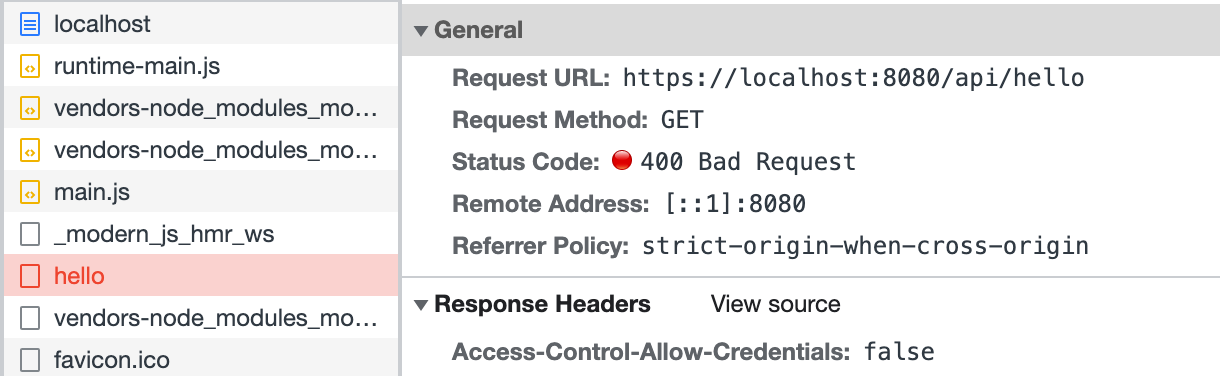
    Network

    最后修改前端代码 src/routes/page.tsx,在访问 /api/hello 前先调用登录接口:

    Note

    此处没有真实实现登录接口,代码仅作为演示。

    import { useState, useEffect } from 'react';
    import { get as hello } from '@api/hello';
    import { post as login } from '@api/login';
    
    export default () => {
      const [text, setText] = useState('');
    
      useEffect(() => {
        async function fetchAfterLogin() {
          const { code } = await login();
          if (code === 0) {
            const { message } = await hello();
            setText(message);
          }
        }
        fetchAfterLogin();
      }, []);
    
      return <p>{text}</p>;
    };

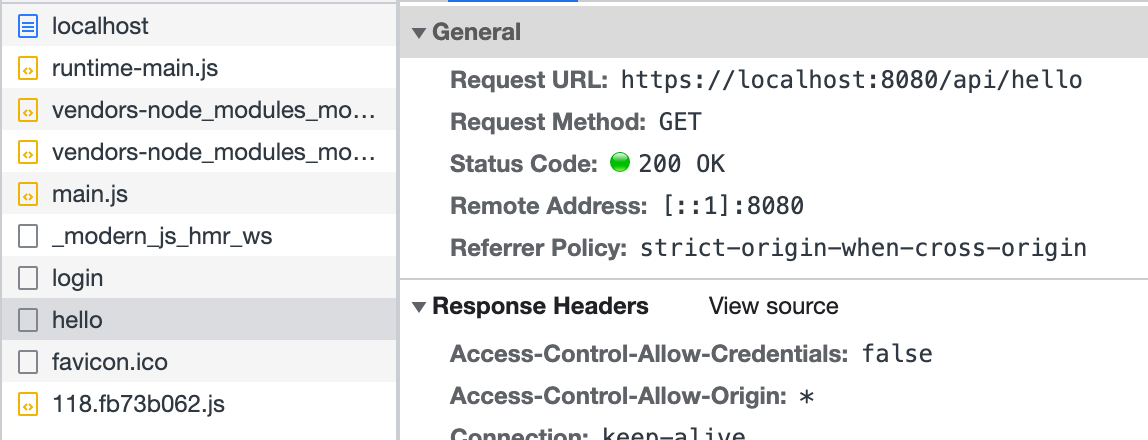
    刷新页面,可以看到 /api/hello 访问成功:

    Network

    以上代码模拟了在 server/Modern.server.ts 中定义中间件的方式,实现了简易的登录功能。同样,可以在这个配置文件中实现其他功能来扩展 BFF Server。